
Migrating from the Hub Locations API to the Places API
Overview
Hub Locations are now backed by Places. This allows you to use the same places that you use in Routing across Samsara.
The Hub Locations API will be closed to new customers on November 1, 2026, and removed on November 1, 2027. Migrate your integration to the Places API before then.
| Location | Place |
|---|---|
| GET /hub/locations | GET /places |
| POST /hub/locations | POST /places |
| PATCH /hub/location/{id} | PATCH /places |
Data model
Terminology
Hub: A Route Planning operational unit that provides the planning context for routes and stops.
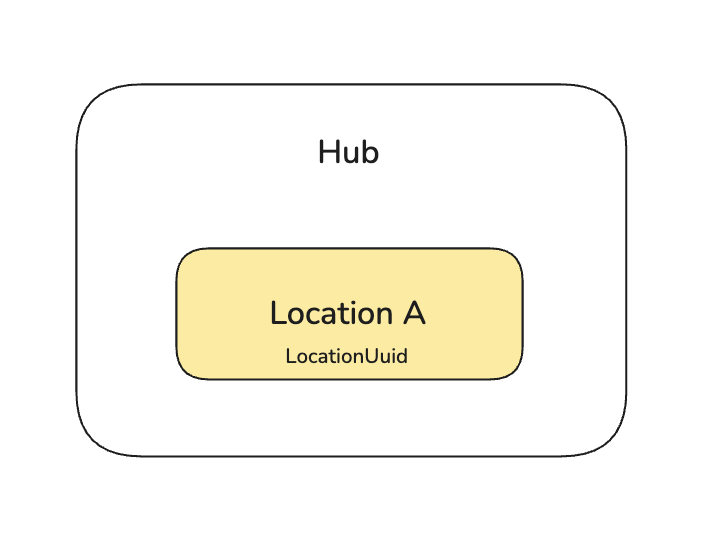
Location: A Hub-scoped Route Planning entity—a recurring geolocation managed within that Hub, with its own routing configuration.
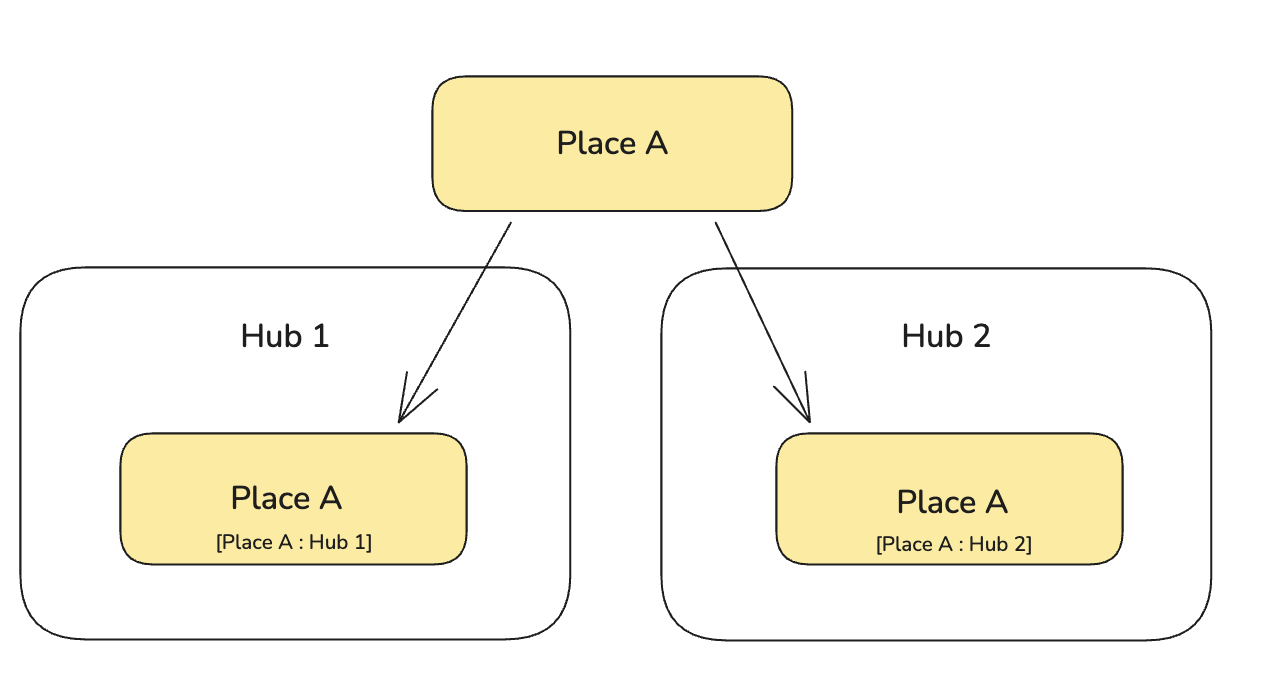
Place: Samsara’s unified record for a physical site and its shared data, such as name, address, geofence, and tags. All locations are now backed by places.
In the Places API, a hub location is uniquely identified by the combination of its Place ID and Hub ID. Instead of looking up a location by its location UUID, look up the place for the relevant hub.
Before: Each location is in one hub
After: A place can be assigned to multiple hubs, keyed by [PlaceId:HubUuid]
Permissions
Before migrating, make sure that:
- The user or service account has permission to view, create, or edit Addresses, depending on the operations your integration performs.
- The API token or OAuth app has Read Places for read requests and Write Places for create and update requests.
To update an API token:
- Open Settings > API Tokens in the Samsara dashboard.
- Create a token or edit the token that your integration uses.
- Add Read Places for read requests.
- Add Write Places for create and update requests.
Access patterns
See the Places API documentation for the full API specification. The following examples show the main changes required for common Hub Locations API operations.
Read hub locations -> Read places
Before:
http GET /hub/locations?hubId=
After:
http GET /places?hubIds=
The Places API supports several lookup and filtering options:
- By hub IDs: GET /places?hubIds=
- By Place IDs: GET /places?placeIds=
- By external IDs: GET /places?externalIds=erpId:LOC-123
- By tag IDs: GET /places?tagIds=
Use either placeIds or externalIds for a batch lookup; do not combine them in the same request. When either is present, list filters and cursor pagination are ignored.
Example response:
{
  "id": "<place-id>",
  "name": "Acme Distribution",
  "routing": [
    {
      "hubId": "<hub-id>",
      "serviceTime": {
        "isEnabled": true,
        "serviceTimeMinutes": 30
      }
    }
  ]
}
The response can include routing settings for multiple hubs. Use the entry in routing whose hubId matches the hub you requested.
Create a new location → Create a new place
Before:
POST /hub/locations
{
  "data": [
    {
      "name": "Acme Distribution",
      "address": "123 Industrial Blvd, Los Angeles, CA 90210, US",
      "latitude": 34.0522,
      "longitude": -118.2437,
      "hubId": "<hub-id>",
      "customerLocationId": "LOC-123",
      "isDepot": false,
      "serviceTimeSeconds": 1800
    }
  ]
}
Please note that new Locations created through the Hub Locations API create new Places. Newly created locations are not deduplicated against existing Places. If the Place already exists, attach the hub to that Place using the Places API instead of creating another one.
After:
POST /places
{
   "name": "Acme Distribution",
   "address": "123 Industrial Blvd, Los Angeles, CA 90210, US",
   "geofence": {
     "circle": {
       "latitude": 34.0522,
       "longitude": -118.2437,
       "radiusMeters": 100
     }
   },
   "routing": [
     {
       "hubId": "<hub-id>",
       "routingExternalId": "LOC-123",
       "isDepot": false,
       "serviceTime": {
         "isEnabled": true,
         "serviceTimeMinutes": 30
      }
    }
  ]
}
This example converts the service time from 1,800 seconds to 30 minutes.
Attach a place to a hub
First, read the Places for a hub that is already attached and select the Place that you want to attach to another hub:
GET /places?hubIds=
Then use the selected Place's id to add the new hub to its routing settings:
PATCH /places?placeId=
{
  "routing": {
    "upsert": [
      {
        "hubId": "<new-hub-id>",
        "routingExternalId": "LOC-456"
      }
    ]
  }
}
Update a place's hub
Update the routing entry for the relevant hub. For example, to update the depot setting and service time for that hub:
Before:
PATCH /hub/location/
{
  "data": {
    "isDepot": true,
    "serviceTimeSeconds": 2700
  }
}After:
PATCH /places?placeId=
{
  "routing": {
    "upsert": [
      {
        "hubId": "<hub-id>",
        "isDepot": true,
        "serviceTime": {
          "isEnabled": true,
          "serviceTimeMinutes": 45
        }
      }
    ]
  }
}
Remove a place from a hub
The Hub Locations API has no delete operation. In the Places API, remove the hub from the Place's routing settings. The Place itself is not deleted, and its routing settings for other hubs are unchanged.
PATCH /places?placeId=
{
  "routing": {
    "removeHubIds": ["<hub-id>"]
  }
}
Updated about 1 month ago